Local AI · One-click setupv3.1.0

Bring large models,
into your computer.

LocModel reads your hardware, recommends open models, and installs the inference engine. Download or import a GGUF, click once, and run it locally. Now it can also create images, generate video, and take action for you.

Windows 10/11 · x64·NVIDIA / AMD / Intel / CPU·Data stays local

NEW Local image generation, video and Agent are here. See what's new
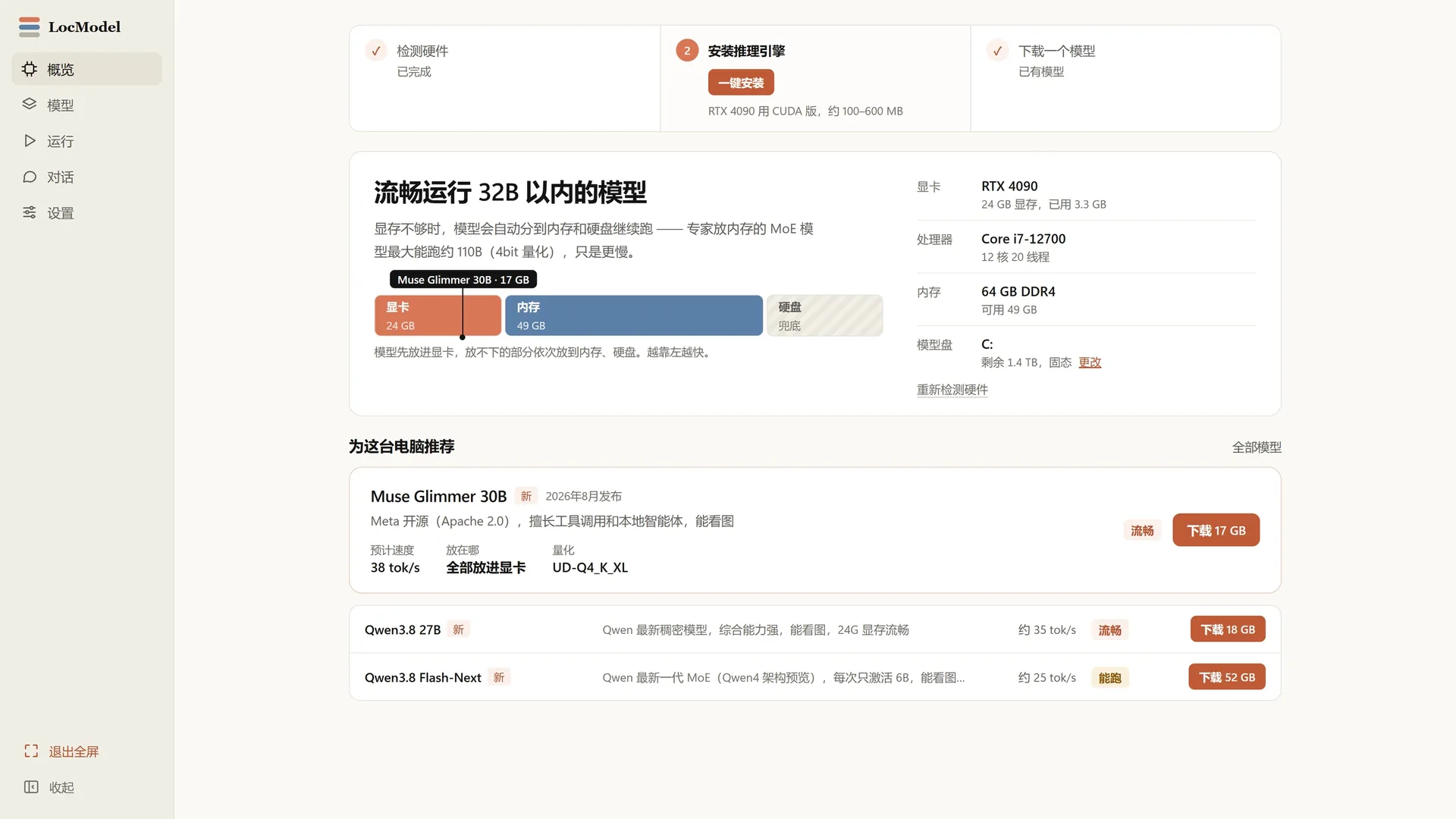
LocModel Overview: Automatically recognizes hardware and recommends models that run smoothly

01LocModel 3.1.0 · Overview

1click engine install
4hardware backends
0cloud dependency
100%local runtime

WHY LOCMODEL

Local deployment,
shouldn't be this hard.

No environment setup, no parameters to memorize. LocModel handles the hard parts and leaves you the models. Now with a canvas, video, and an Agent that takes action.

01

Detect hardware

See your GPU, CPU, memory and disk at a glance, and know which models will run and how fast.

02

One-click engine

Automatically matches the llama.cpp backend for NVIDIA, AMD, Intel and CPU. No compiling required.

03

Your models, your way

Download HuggingFace models online or import local GGUF files. Your models stay yours, without platform lock-in.

04

Smart VRAM tiering

When a model does not fit in VRAM, some layers move to RAM and disk automatically. Large models still run, just a little slower.

01 / HARDWARE

It reads
your computer.

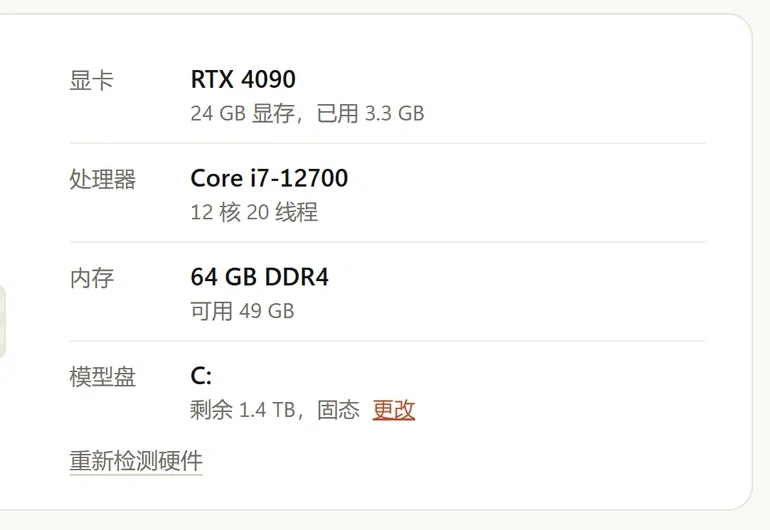
Open LocModel and see a hardware check first, not a wall of settings: GPU and VRAM, CPU cores, available memory and model disk space.
  • Automatically identify NVIDIA/AMD/Intel/CPU
  • Recommend models that can run smoothly based on graphics memory and memory
  • See speed and first load time before launching
View supported hardware
this computer
LocModel hardware detection: RTX 4090, Core i7-12700, 64 GB DDR4 and model disk information
Recommended
Muse Glimmer 30B 38 tok/s · 17 GB · All put into graphics card
LocModel installs the inference engine with one click, automatically identifies the graphics card and displays the download progress
CUDAVulkanCPU

02 / ENGINE

The engine,
ready in one click.

LocModel downloads the official llama.cpp build that matches your GPU. On a slow connection you can import the ZIP manually—progress, speed and time remaining stay visible.

  • Automatically identify NVIDIA CUDA, AMD, Intel and CPU
  • The download can be paused, and if it fails, you can try again.
  • Supports manual import of local engines and can be installed offline

03 / MODELS

Models,
right here.

Recommended models, online search and installed models live on one page. Each one shows size, quantization, expected speed and fit.
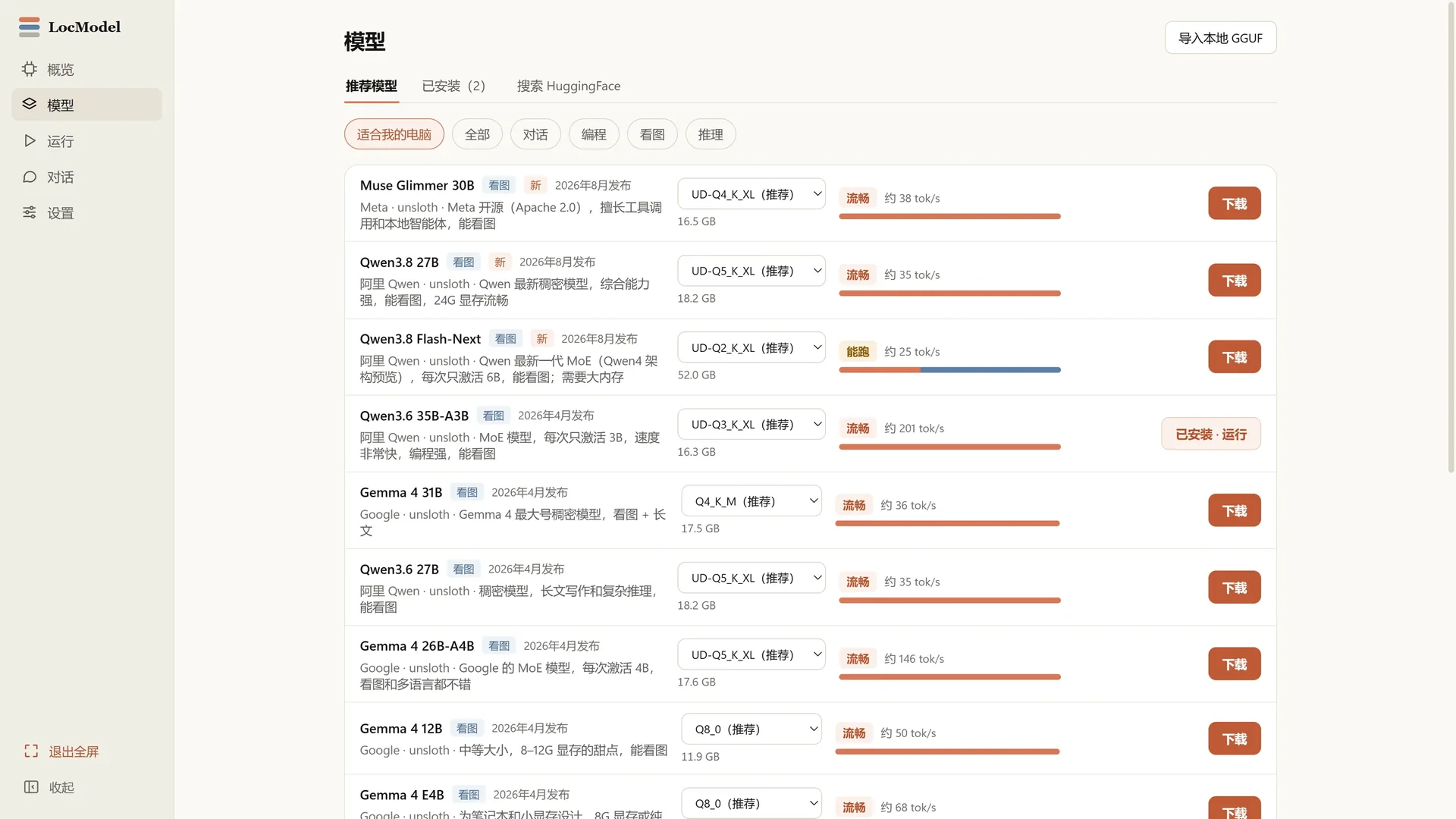
LocModel model library: recommended models, online downloads, installed models and HuggingFace search
A

Online download

Filter HuggingFace models by hardware and usage and start downloading with one click.

B

Import GGUF

Local files are imported directly without converting the format or uploading them anywhere.

C

Installed management

Version, size, quantification method and running status can be read in one page.

NEW / IMAGE

One prompt,
four images.

Write a prompt, choose an aspect ratio, steps, image count and seed. Z-Image Turbo generates directly on your GPU—no uploads, no queue.
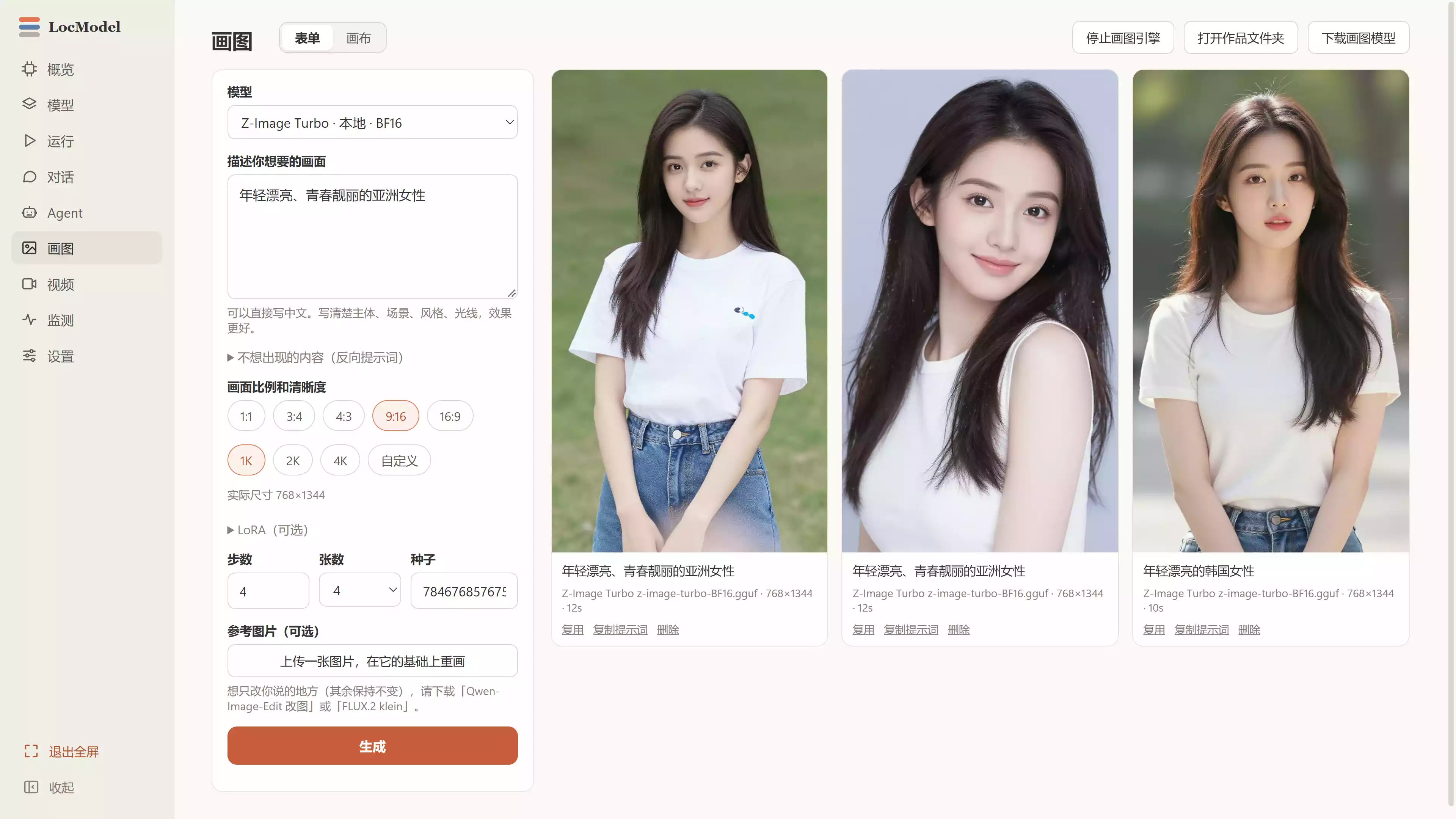
  • The subject, scene, style and light can all be described in Chinese
  • 1:1, 3:4, 4:3, 9:16, 16:9 five formats
  • The number of steps, sheets, and seeds are adjustable, and satisfactory results can be reproduced.
  • Supports redrawing of reference pictures and continues to make changes on the original picture
Z-Image TurboZ-Image EditFLUX.2 kleinlocal reasoning
LocModel local drawing interface: Chinese prompt words, frame, number of steps, number of pictures, seeds and locally generated portraits

Paint · Z-Image Turbo · 768 × 1344 · Locally generated
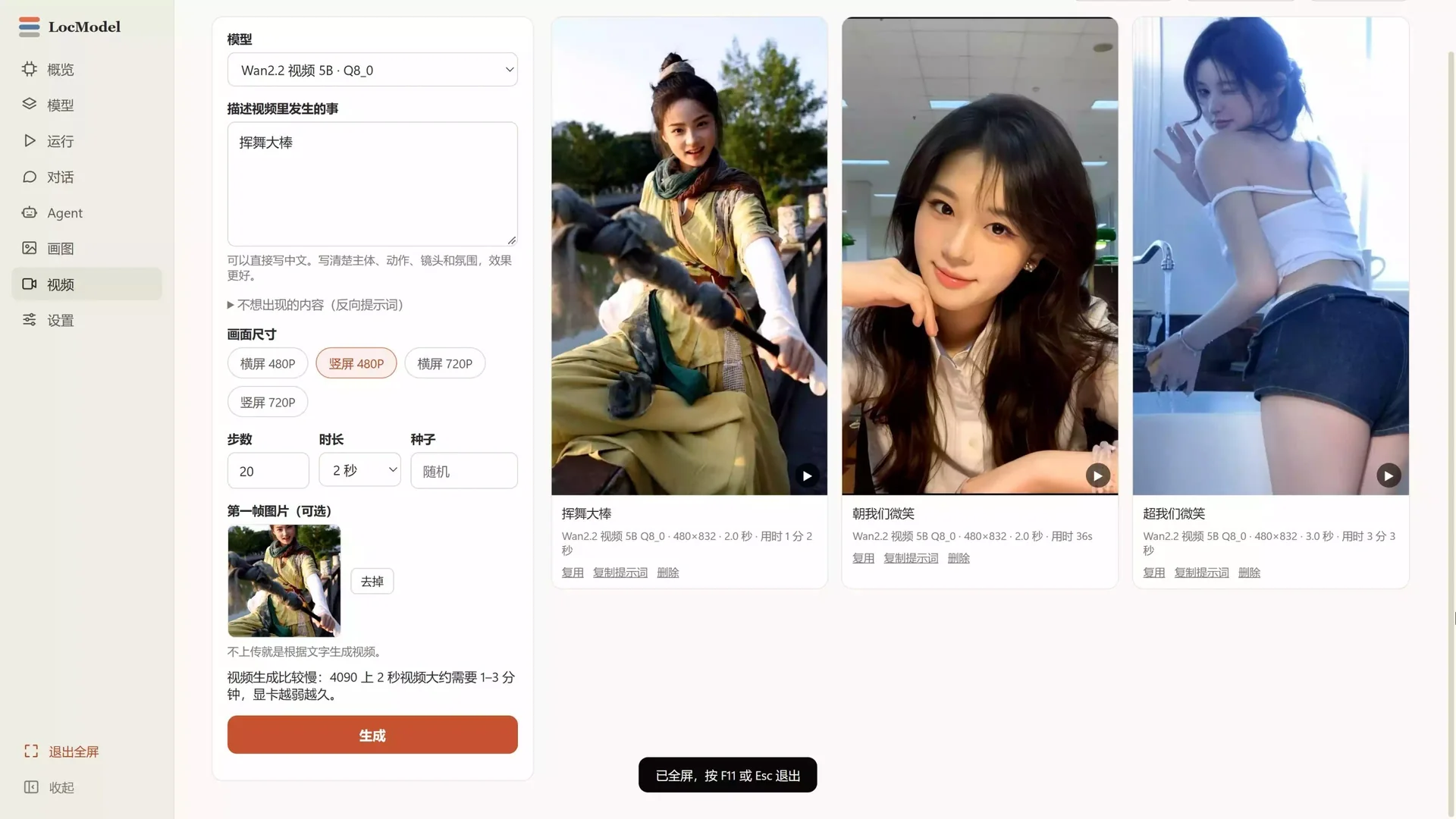
LocModel local video generation interface: Wan2.2 model, prompt words, horizontal and vertical screen sizes, duration and vertical video results

Video · Wan2.2 video 5B · Vertical screen 480P · Locally generated

NEW / VIDEO

Bring images,
to life.

Describe the subject, motion, camera and mood, and Wan2.2 turns it into a short video. You can also supply a first frame and continue the scene.

  • Text can be directly generated into a video, or the first frame can be uploaded to continue writing.
  • Landscape/portrait screen, 480P and 720P optional
  • Duration, number of steps, seeds and reverse prompt words can be adjusted
  • The generation progress and time consumption are directly displayed, so there is no need to wait blindly.
Wan2.2 video 5BVincent Videotusheng videoVertical screen 480P / 720P

04 / RUN

The settings
are already handled.

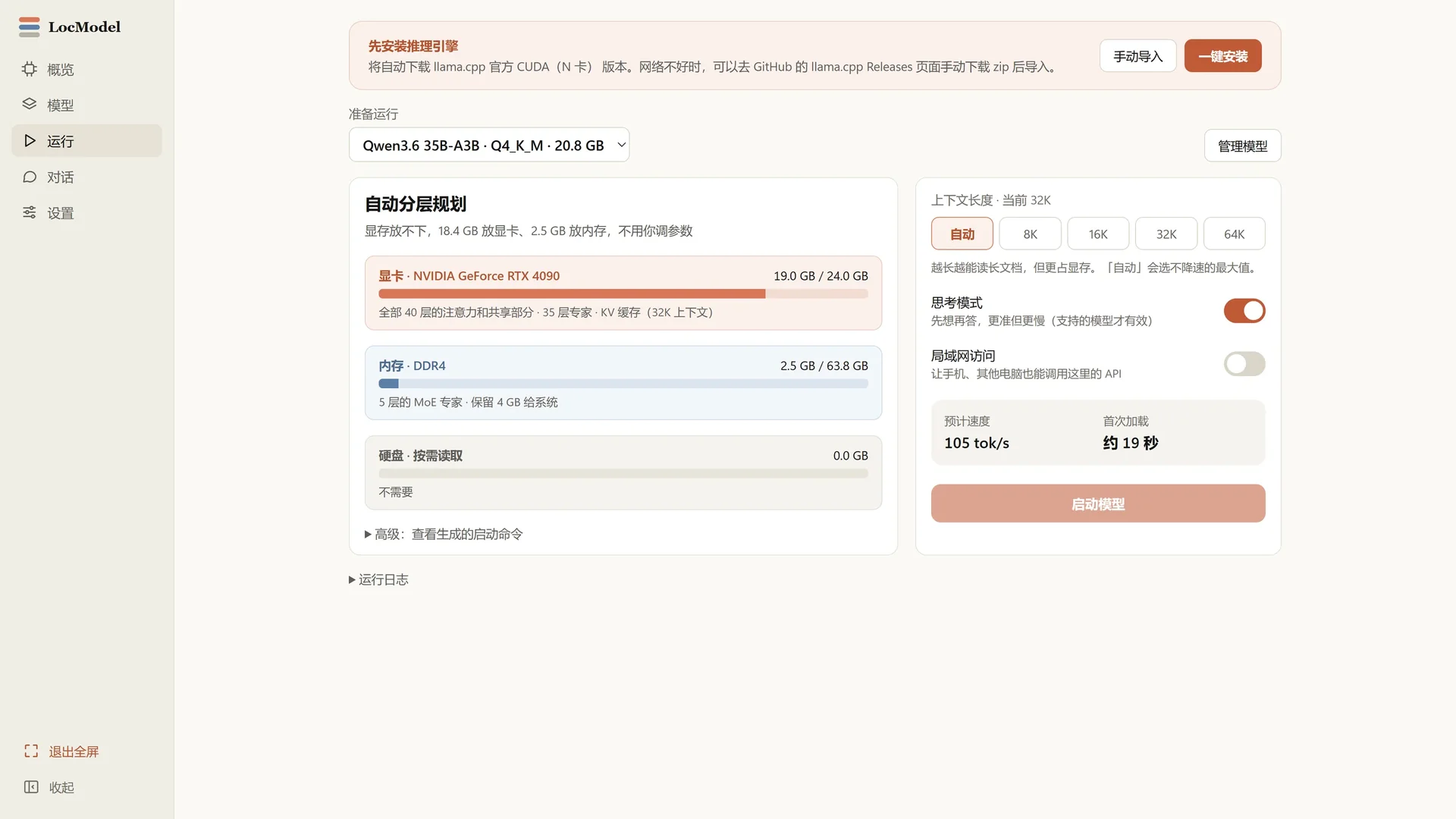
Context length, thinking mode, LAN access and expected speed are all close at hand. The defaults are already good.
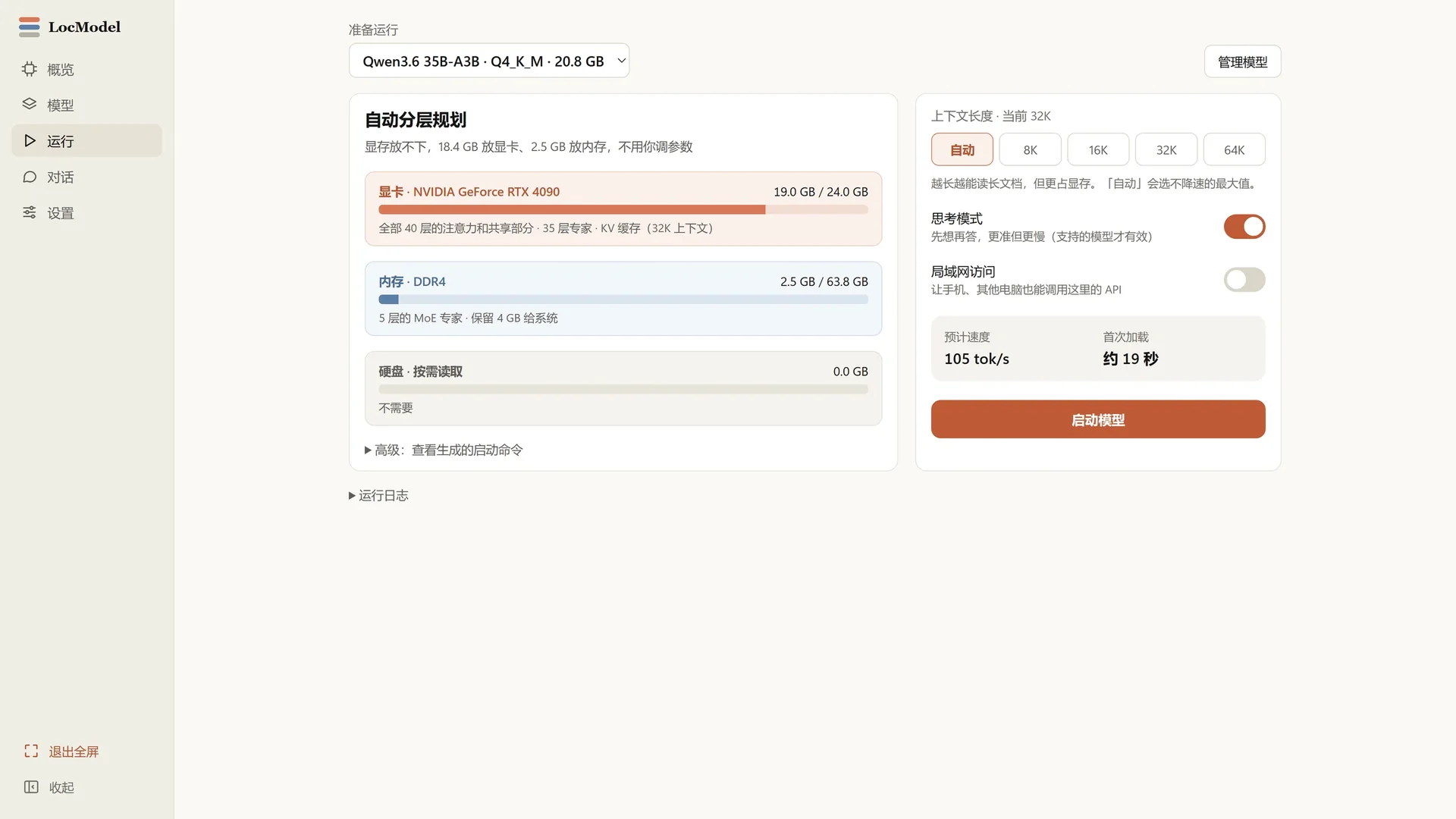
  • 8K / 16K / 32K / 64K context switching with one click
  • Thinking model, let the model think first before answering
  • LAN access, mobile phones and other computers can also call
LocModel launch model: context length, thought mode, LAN access, estimated speed and first load time
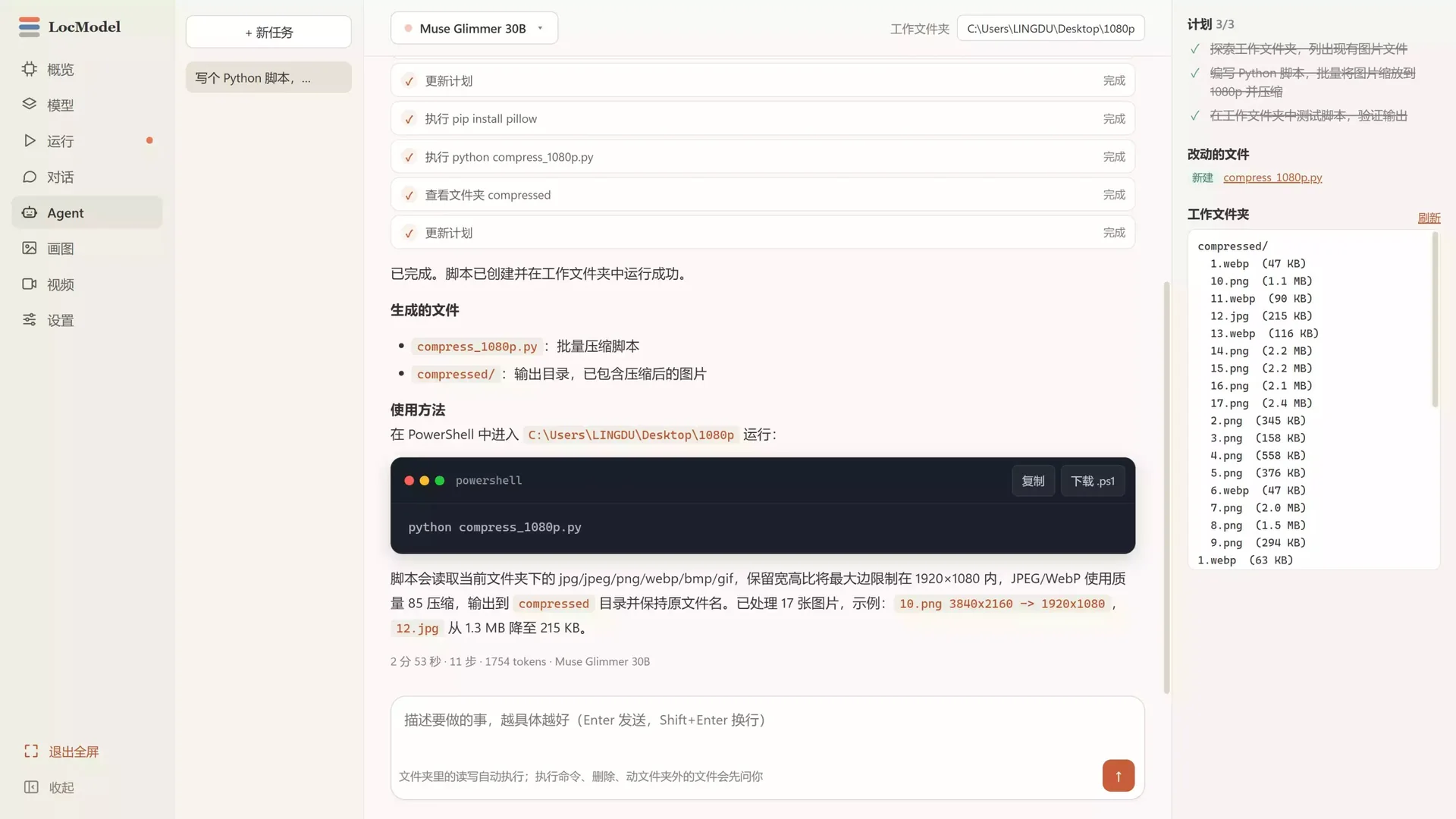
LocModel Agent Interface: Task Scheduler, PowerShell Commands, Makefiles and Working Folder Lists

Agent · Muse Glimmer 30B · 11 steps · 2 minutes 53 seconds

NEW / AGENT

Give it a task,
it gets to work.

Choose a working folder and the Agent plans the task, reads and writes files, creates scripts and runs commands. It updates each step and lists the results when done.

  • Automatically generate plans, execute them step by step and update progress
  • Read and write within folders, run Python/PowerShell
  • Ask before deleting, moving, or accessing content outside the folder
  • After completion, verify the output and not just reply "It should be OK"

Automatically execute within the folder · Ask you first outside the folder

Muse Glimmer 30BAgent that acts locallyFile reading and writingcommand execution

NEW / CHAT & CODE

Talk it through,
and write it out.

From a question to a working script. The local model reads attachments, writes code and explains its approach, with one-click copy or download for code blocks.
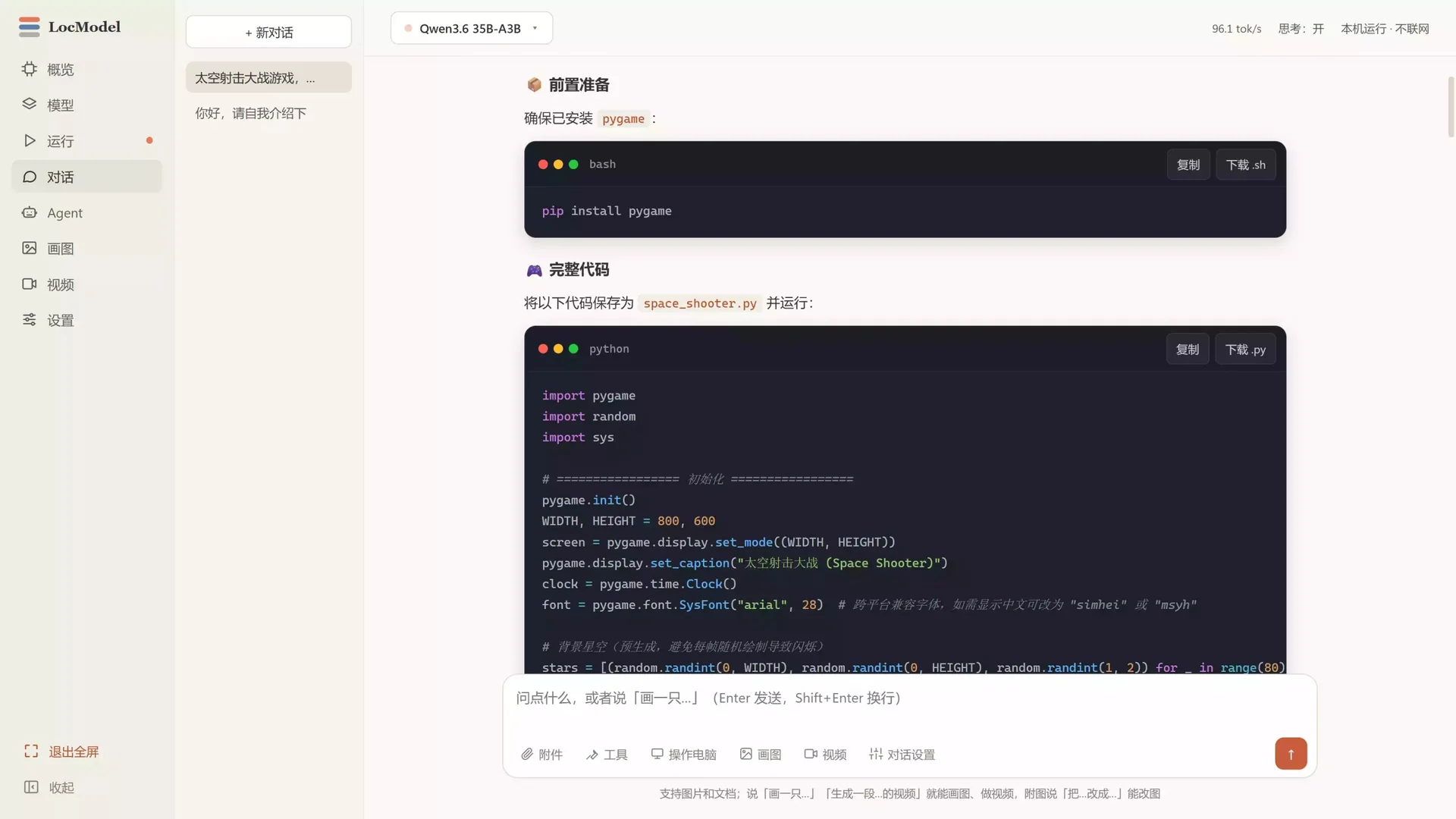
  • Multi-turn dialogue, supporting attachments, documents and long context
  • One-click copy/download of code blocks .py/.sh
  • Thinking patterns, tok/s and context length are all visible
  • The whole process is local reasoning, and it can continue even if the network is disconnected.
Qwen3.6 35B-A3B96.1 tok/sThinking modelLocal · Not connected to the Internet
LocModel local dialogue interface: Qwen3.6 generates the complete code of the Pygame space shooting game. The code blocks can be copied and downloaded.

Dialog and Code · Qwen3.6 35B-A3B · 96.1 tok/s

05 / AUTO TIERING

Not enough VRAM?
Keep going.

LocModel places attention layers, expert layers and KV cache across GPU, RAM and disk. Further left is faster; whatever does not fit moves back automatically.
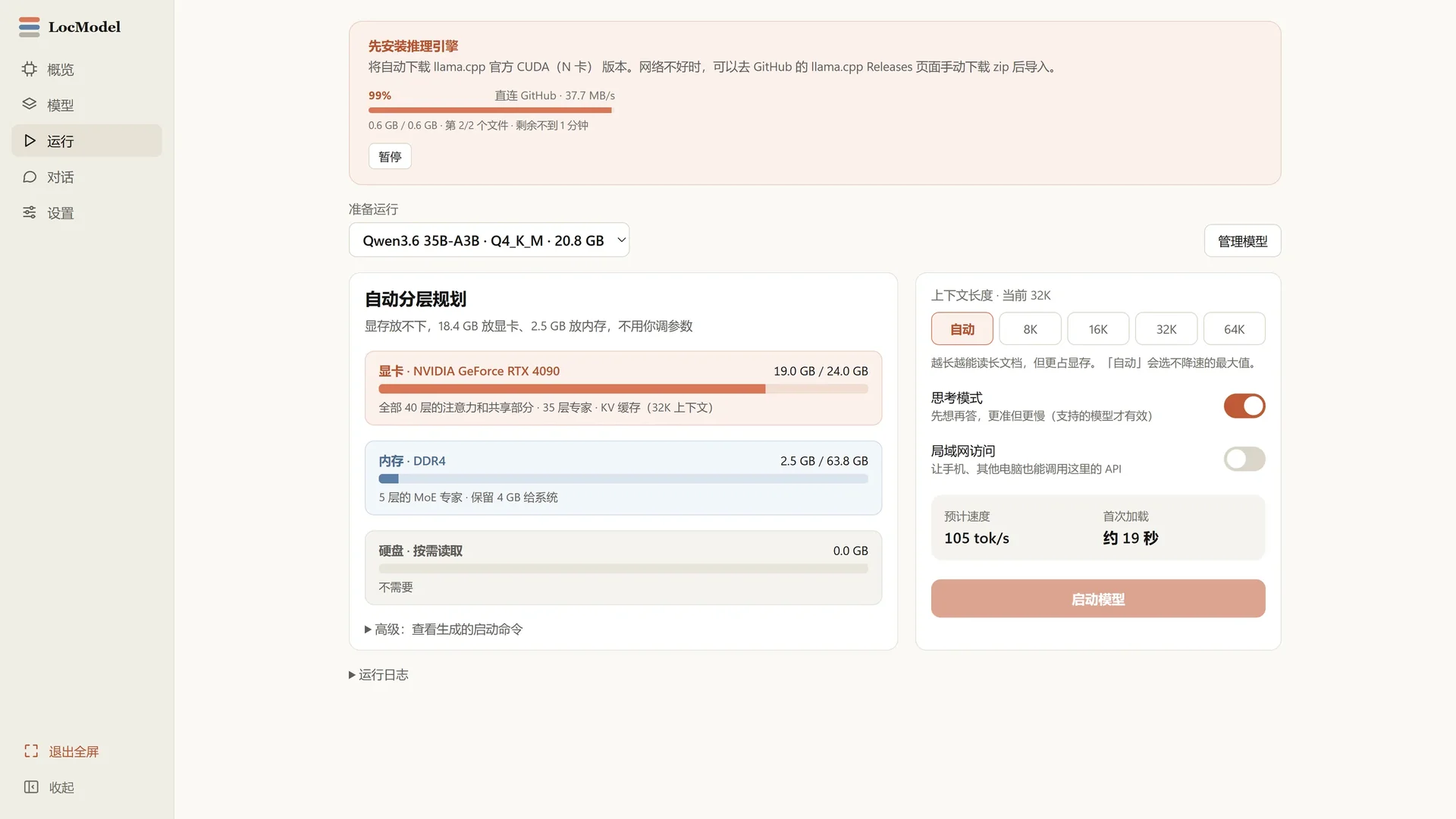
Graphics card · RTX 409019.0 / 24.0 GB
Attention / Shared Section / KV Cache
Memory · DDR42.5 / 63.8 GB
Layer 5 MoE Expert · Reserve 4 GB for the system
Hard drive · Read on demand0.0 GB
It is only used when it cannot be put down. Capacity is replaced by speed.
LocModel automatic hierarchical planning: memory allocation of graphics cards, memory and hard disks, and inference engine download progress

No need to adjust parameters. LocModel will do the math itself.

HOW IT WORKS

Three steps,
from zero to running.

No command line, no pile of docs. Open LocModel and follow the interface.

01

Detect hardware

Automatically reads the graphics card, processor, memory and disk, and generates a list of what models can be run.

02

Install engine

Match your graphics card and download the corresponding inference backend. Progress is visible and can be paused at any time.

03

Download and launch

Select a model, or import GGUF locally. Click Start to start local inference; you can also directly draw pictures, generate videos, or hand over tasks to the Agent.

COMPATIBILITY

From CPU to RTX 5090,
there's room for everyone.

NVIDIA CUDA AMD Intel CPU Windows 10/11 x64 GGUF HuggingFace Z-Image Wan2.2 Agent

LOCAL BY DEFAULT

Models stay local,
your data stays home.

No account, no cloud queue, no usage limits. Download, import and run everything on this computer. Image generation, video and Agent tasks work the same way.

  • No need to log in, just open it and use it
  • Prompt words, reference pictures and generated pictures and videos do not leave the machine
  • Reasoning, drawing, generating videos and executing Agent can also be done offline

DOWNLOAD

Put LocModel
Install it into your computer.

Windows 10/11 x64 · Free · Double-click to install. Windows is the primary platform; macOS and Linux builds are also available.

LocModel_3.1.0_x64-setup.exe v3.1.0

OTHER PLATFORMS

Windows is primary · macOS and Linux also available
macOS NEW Universal · Apple Chips and Intel Macs
Download .dmg
First launch on macOS

No certificate yet. After downloading, right-click → Open to run. If it still will not install, run this in Terminal:

sudo xattr -rd com.apple.quarantine /Applications/LocModel.app